
Introduction
WSA RPC Bridge is an app that retrieves media playback information from apps running on WSA (Windows Subsystem for Android) or Android devices and displays it as Discord Rich Presence.
What It Can Do
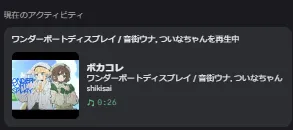
Section titled “What It Can Do”- When media plays in a supported app on WSA / Android, the track title, artist name, player app name, and playback position are automatically displayed as a Discord activity
- Works with both the desktop and Android versions
What It Cannot Do
Section titled “What It Cannot Do”- Windows-native media playback is not supported. Playback in PC browsers or desktop music apps cannot be detected. This app is dedicated to media playing on WSA / Android
- You never log in to Discord from this app itself, but a separately installed logged-in Discord client / app is required
Downloads are available from Releases (Windows: *.msi / Android: *_android_arm64.apk). See Verification to confirm file authenticity.
Supported Environments
Section titled “Supported Environments”| Desktop (Windows) | Android | |
|---|---|---|
| OS | Windows 11 or later (WSA requires Windows 11) | Android 7.0 (API 24) or later |
| Additional requirements | WSA installed + developer mode | Notification access permission granted |
| Discord | Logged-in desktop client | Logged-in Discord app |
| Distribution format | MSI installer | APK |
Desktop Setup
Section titled “Desktop Setup”- Download the MSI installer from Releases and install it
- Enable developer mode in WSA. The ADB connection relies on this developer mode
- If WSA is not installed yet, WSABuilds is an easy way to get it
- Launch the app, and have a logged-in Discord client running
- Play music or video in an app inside WSA, and it will be reflected on Discord within seconds
Android Setup
Section titled “Android Setup”- Download the APK from Releases and install it
- Launch the app and grant notification access permission (the guidance banner takes you to the settings screen)
- In the Settings tab, add the music apps you want detected to the whitelist
- With the Discord app running, currently playing media is reflected on Discord
On Android 13 or later, also grant the notification permission so the persistent service notification can be shown. See Android Version Support for version-specific differences.
Next Steps
Section titled “Next Steps”- What each setting means: Settings
- Internal behavior and transmitted data: How It Works
- If something does not work: Troubleshooting